Gadgets Security

Keep your mobile gadget secure

Secure Your Server

We must study how to harder our servers

Internet Security

Secure your computer, Secure your browser, and enjoy to browsing to internet

This is default featured post 4 title

Go to Blogger edit html and find these sentences.Now replace these sentences with your own descriptions.

Monitor your System Network

Make your network in your hand and under control

Showing posts with label Web Hacking. Show all posts

Friday, July 15, 2011

Mantra Security Toolkit 0.6.1 Released – Browser Based Hacking Framework

Mantra is a collection of free and open source tools integrated into a web browser, which can become handy for students, penetration testers, web application developers,security professionals etc. It is portable, ready-to-run, compact and follows the true spirit of free and open source software.
The software is intended to be lite, flexible, portable and user friendly with a nice graphical user interface. You can carry it in memory cards, flash drives, CD/DVDs, etc. It can be run natively on Linux, Windows and Mac platforms. It can also be installed on to your system within minutes. Mantra is absolutely free of cost and takes no time for you to set up.
Mantra can be very helpful in performing all the five phases of attacks including reconnaissance, scanning and enumeration, gaining access, escalation of privileges, maintaining access, and covering tracks. Apart from that it also contains a set of tools targeted for web developers and code debuggers which makes it handy for both offensive security and defensive security related tasks.
Project Goals
  • Create an ecosystem for hackers based on browser
  • To bring the attention of security people to the potential of a browser based security platform
  • Provide easy to use and portable platform for demonstrating common web based attacks( read training )
  • To associate with other security tools/products to make a better environment.
You can download Mantra 0.6.1 here:
Linux 32-bit – Mantra Security Toolkit – Gandiva.tar.bz2
Windows – OWASP Mantra Security Toolkit – Gandiva.exe

sslsniff v0.6 Released – SSL MITM Tool.

This tool was originally written to demonstrate and exploit IE’s vulnerability to a specific “basicConstraints” man-in-the-middle attack. While Microsoft has since fixed the vulnerability that allowed leaf certificates to act as signing certificates, this tool is still occasionally useful for other purposes.
It is designed to MITM all SSL connections on a LAN and dynamically generates certs for the domains that are being accessed on the fly. The new certificates are constructed in a certificate chain that is signed by any certificate that you provide.
The three steps to get this running are:
  • Download and run sslsniff-0.7.tar.gz
  • Setup iptables
  • Run arp-spoof
Changes in 0.7
  • Fixed some networking shuffling bugs (thanks Daniel Roethlisberger)
  • Added basic compatibility with BSD pf (thanks Daniel Roethlisberger)
You can download sslsniff v0.7 here:
sslsniff-0.7.tar.gz

Vega – Open Source Cross Platform Web-Application Security Assessment Platform

Vega is an open source platform to test the security of web applications. Vega can help you find and validate SQL Injections, Cross-Site Scripting (XSS), inadvertently disclosed sensitive information, and other vulnerabilities. It is written in Java, GUI based, and runs on Linux, OS X, and Windows.

Vega includes an automated scanner for quick tests and an intercepting proxy for tactical inspection. Vega can be extended using a powerful API in the language of the web: Javascript.

Features

Automated Crawler and Vulnerability Scanner
Consistent UI
Website Crawler
Intercepting Proxy
SSL MITM
Content Analysis
Extensibility through a Powerful Javascript Module API
Customizable alerts
Database and Shared Data Model

There are also modules for:

Cross Site Scripting (XSS)
SQL Injection
Directory Traversal
URL Injection
Error Detection
File Uploads
Sensitive Data Discovery

There is documentation for getting started here or check out the intro to the Vega Proxy here.

You can download Vega here:
Windows – 32-bit/64-bit
Linux – 32-bit/64-bit

WPScan – WordPress Security/Vulnerability Scanner

WPScan is a vulnerability scanner which checks the security of WordPress installations using a black box approach (scanning without any prior knowledge of what has been installed etc).
Features
  • Username enumeration (from author querystring and location header)
  • Weak password cracking (multithreaded)
  • Version enumeration (from generator meta tag)
  • Vulnerability enumeration (based on version)
  • Plugin enumeration (2220 most popular by default)
  • Plugin vulnerability enumeration (based on version) (todo)
  • Plugin enumeration list generation
  • Other misc WordPress checks (theme name, dir listing, …)
Requirements
WPScan requires two non native Ruby gems, typhoeus and xml-simple. It should work on both Ruby 1.8.x and 1.9.x.
sudo apt-get install libcurl4-gnutls-dev
sudo gem install –user-install typhoeus
sudo gem install –user-install xml-simple
The full README is available here.
You can download WPScan by checking it out from the SVN repository on Google Code:
svn checkout http://wpscan.googlecode.com/svn/trunk/ wpscan-read-only
Or you can read more here.

Tuesday, June 14, 2011

Wappalyzer – Web Technology Identifier (Identify CMS, JavaScript etc.)

Wappalyzer is an add-on for Firefox that uncovers the technologies used on websites. It detects CMS and e-commerce systems, message boards, JavaScript frameworks, hosting panels, analytics tools and several more.
The company behind Wappalyzer also collects information about web based software to create publicly available statistics, revealing their growth over time and popularity compared to others. Most of this data is anonymously collected from this Firefox add-on which has been installed by thousands of users.
Wappalyzer was founded in 2008 by Elbert F and has been made possible with the funding of AOE media GmbH, the leading Open Source web development company in Germany.
It detects the majority of common CMS systems, a full list can be found here.
You can download Wappalyzer here:
Wappalyzer.xpi

BodgeIt Store – Vulnerable Web Application For Penetration Testing

There are various vulnerable web applications such as Jarlsberg, WackoPicko, Damn Vulnerable Web Application (DVWA), Vicnum, etc. Now we have another application that is vulnerable and ready to be exploited! The BodgeIt Store is a vulnerable web application which is currently aimed at people who are new to penetration testing.

Features

Easy to install – just requires java and a servlet engine, e.g. Tomcat
Self contained (no additional dependencies other than to 2 in the above line)
Easy to change on the fly – all the functionality is implemented in JSPs, so no IDE required
Cross platform
Open source
No separate db to install and configure – it uses an ‘in memory’ db that is automatically (re)initialized on start up

There is also a ‘scoring’ page where you can see various hacking challenges and whether you have completed them or not.

nstall All you need to do is download and open the zip file, and then extract the war file into the webapps directory of your favorite servlet engine.
Then point your browser at (for example) http://localhost:8080/bodgeit
The author recommends Zed Attack Proxy to get you started.
You can download BodgeIt Store here:
bodgeit.1.1.0.zip

OWASP Hatkit Proxy Project – HTTP/TCP Intercepting Proxy Tool

The primary purpose of the Hatkit Proxy is to create a minimal, lightweight proxy which stores traffic into an offline storage where further analysis can be performed, i.e. all kinds of analysis which is currently implemented by the proxies themselves (WebScarab/Burp/Paros etc).

Also, since the http traffic is stored in a MongoDB, the traffic is stored at an object-level, retaining the structure of the parsed traffic.

Features

Swing-based UI,
Interception capabilities with manual edit, both for TCP and HTTP traffic,
Syntax highlightning (html/form-data/http) based on JFlex,
Storage of http traffic into MongoDB database,
Possibilities to intercept in Fully Qualified mode (like all other http-proxies) OR Non-fully qualified mode. The latter means that interception is performed *after* the host has been parsed, thereby enabling the user to submit non-valid http content.
A set of filters to either ignore or process traffic which is routed to the proxy. The ‘ignored’ traffic will be streamed to the endpoint with minimal impact on performance.

Known Issues

HTTP-intercept: Some button/checkboxes in the interception window does not work
TCP-intercept: The statistics counters are incorrect.

You can download OWASP Hatkit Proxy here:
hatkit_proxy-0.5.1.zip

Burp Suite Free Edition v1.4 – Web Application Security Testing Tool

We love Burp Suite and we have since wayyyy back, the last update we posted was around 18 months ago back in January 2010 – Burp Suite v1.3 Released – Integrated Platform For Attacking Web Applications.

For the two people here who don’t know what this tool does, Burp Suite is an integrated platform for performing security testing of web applications. Its various tools work seamlessly together to support the entire testing process, from initial mapping and analysis of an application’s attack surface, through to finding and exploiting security vulnerabilities.

Burp gives you full control, letting you combine advanced manual techniques with state-of-the-art automation, to make your work faster, more effective, and more fun.

And now, we’re happy to announce there’s a new version out and it’s available for download now!

New Features

The ability to compare site maps
Functions to help with testing access controls using your browser
Support for preset request macros
Session handling rules to help you work with difficult situations
In-browser rendering of responses from all Burp tools
Auto recognition and rendering of character sets
Support for upstream SOCKS proxies
Headless mode for unattended scripted usage
Support for more types of redirection
Support for NTLMv2 and IPv6
Numerous enhancements to Burp’s extensibility
Greater stability on OSX

You can download Burp Suite Free Edition v1.4 here:

burpsuite_v1.4.zip

WATOBO – The Web Application Toolbox

WATOBO is intended to enable security professionals to perform highly efficient (semi-automated ) web application security audits. We are convinced that the semi-automated approach is the best way to perform an accurate audit and to identify most of the vulnerabilities. WATOBO has no attack capabilities and is provided for legal vulnerability audit purposes only.

How Does It Work?

WATOBO works like a local proxy, similar to Webscarab, Paros or BurpSuite.

Additionally, WATOBO supports passive and active checks. Passive checks are more like filter functions. They are used to collect useful information, e.g. email or IP addresses. Passive checks will be performed during normal browsing activities. No additional requests are sent to the (web) application.

Active checks instead will produce a high number of requests (depending on the check module) because they do the automatic part of vulnerability identification, e.g. during a scan.

WATOBO Advantages

  • Session Management capabilities! You can define login scripts as well as logout signatures. So you don’t have to login manually each time you get logged out.
  • Can perform vulnerability checks out of the box.
  • Supports Inline De-/Encoding, so you don’t have to copy strings to a transcoder and back again. Just do it inside the request/response window with a simple mouse click.
  • Smart filter functions, so you can find and navigate to the most interesting parts of the application easily.
  • Written in (FX)Ruby and enables you to define your own checks
  • Free software ( licensed under the GNU General Public License Version 2)
There is an ‘unofficial’ manual here:
WATOBO – the unofficial manual
And some video tutorials to get you started here.

XSSer v1.0 – Cross Site Scripter Framework

XSSer is an open source penetration testing tool that automates the process of detecting and exploiting XSS injections against different applications.

It contains several options to try to bypass certain filters, and various special techniques of code injection.

New Features

Added “final remote injections” option
Cross Flash Attack!
Cross Frame Scripting
Data Control Protocol Injections
Base64 (rfc2397) PoC
OnMouseMove PoC
Browser launcher
New options menu
Pre-check system
Crawler spidering clones
More advanced statistics system
“Mana” ouput results

You can download XSSer v1.0 here:
xsser-1.0.tar.gz

LFIMAP – Scan For Files Vulnerable To LFI (Local File Inclusion)

There are some existing tools that deal with LFI vulnerabilities such as fimap the Remote & Local File Inclusion (RFI/LFI) Scanner and inspathx a Tool For Finding Path Disclosure Vulnerabilities (which can lead to the discovery of LFI).

A new simple tool was released recently which focuses purely on LFI attacks.

Functions

Automatically find the root of the file system
Detect default files outside of the web folder
Attempts to detect passwords inside the files
Supports basic authentication
Can use null byte to bypass some controls
Writes a report of the scan to a file

You can download LFIMAP 1.4.3 here:
lfimap-1.4.3.tar.gz

SQLInject-Finder – Intelligent SQL Injection Detection Script

SQLInject-Finder is a simple python script that parses through a pcap and looks at the GET and POST request data for suspicious and possible SQL injects. Rules to check for SQL injection can be easily added. Output can be printed neatly on the command line or in tab delimited format.
The output includes:
  • The suspicious IP address
  • The attacked webpage
  • The parameter and value used
  • The frame number of the packet within the pcap (can be used to find exactly where the packet is in Wireshark)
  • The reason why the request was flagged
Requirements
This script was tested using Python 2.6.5. Other versions are not guaranteed to work.
This script depends on the dpkt libraries.
You can download SQLInject-Finder here:
sqlinject-finder.py

Mantra Security Toolkit – Free & Open Source Browser-Based Security Framework

24 January 2011 | 11,912 views
Mantra Security Toolkit – Free & Open Source Browser-Based Security Framework
Want to Learn Penetration Testing

Mantra is a dream that came true. It is a collection of free and open source tools integrated into a web browser, which can become handy for students, penetration testers, web application developers, security professionals etc. It is portable, ready-to-run, compact and follows the true spirit of free and open source software. Mantra is a security framework which can be very helpful in performing all the five phases of attacks including reconnaissance, scanning and enumeration, gaining access, escalation of privileges, maintaining access, and covering tracks. Apart from that it also contains a set of tools targeted for web developers and code debuggers which makes it handy for both offensive security and defensive security related tasks.

Mantra is lite, flexible, portable and user friendly with a nice graphical user interface. You can carry it in memory cards, flash drives, CD/DVDs, etc. It can be run natively on Linux, Windows and Mac platforms. It can also be installed on to your system within minutes. Mantra is absolutely free of cost and takes no time for you to set up.

The Mantra is a powerful set of tools to make the attacker’s task easier. The beta version of Mantra Security Toolkit contains following tools built onto it –
Mantra Tools List
You can also always suggest any tools/ scripts that you would like see in the next release.
Supports forums are available here.
You can download Mantra here:
Windows – MantraPortable Alpha Release 200.12.exe
Linux – mantra-portable-pre-alpha.tar.bz2

sessionthief – HTTP Session Cloning & Cookie Stealing Tool

sessionthief performs HTTP session cloning by cookie stealing. It can issue basic nmap and nbtscan commands to see which IPs are on the subnet, or just listen for IPs broadcasting packets. It can quickly perform ARP poison routing to get packets given the IP of the client if not on an open network or hub, and should also work with interfaces in monitor mode. It integrates automatically with Firefox, dynamically creating a temporary profile for each attack performed. In this way, in contrast to tools like the middler, it doesn’t require any additional configuration, and makes it easy to simultaneously own multiple logins to the same site.

For example, if multiple clients on the open or WEP-encrypted wireless network you are on are on Facebook (or yahoo mail or just about any site you log into), you can:

Start the program
Select your interface
Hit watch
Select a request from each of them to facebook, and click the session button.

The program will start a new instance of firefox for each session hacked, and let you control the login of all of them at once. It compiles and runs on linux and windows depending on the pcap and wxwidgets libraries.

You can download sessionthief here:

sessionthief.zip

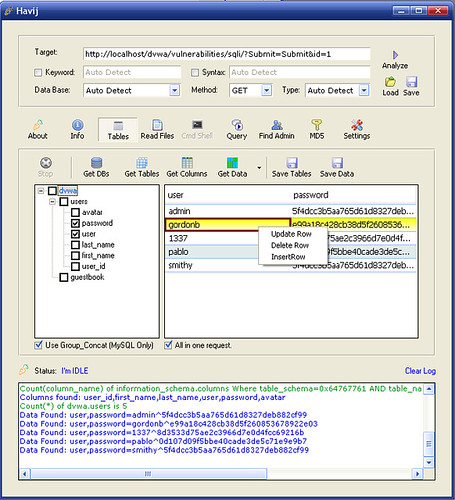
Havij – Advanced Automated SQL Injection Tool

Havij is an automated SQL Injection tool that helps penetration testers to find and exploit SQL Injection vulnerabilities on a web page.

It can take advantage of a vulnerable web application. By using this software user can perform back-end database fingerprint, retrieve DBMS users and password hashes, dump tables and columns, fetching data from the database, running SQL statements and even accessing the underlying file system and executing commands on the operating system.

The power of Havij that makes it different from similar tools is its injection methods. The success rate is more than 95% at injection vulnerable targets using Havij.

The user friendly GUI (Graphical User Interface) of Havij and automated settings and detections makes it easy to use for everyone even amateur users.

Havij - SQL Injection Tool
There is a free version available and also a more fully-featured commercial edition available here.

You can download Havij v1.12 Free Edition here:
Havij1.12Free.rar

inspathx – Tool For Finding Path Disclosure Vulnerabilities

inspathx is a tool that uses local source tree to make requests to the URL and searches for path inclusion (Full Path Disclosure) error messages. It’s a very common problem in PHP web applications that crops up a lot.
PHP Web application developers sometimes fail to add safety checks against authentications, file inclusion etc and are prone to reveal possible sensitive information when those applications URLs are directly requested. Sometimes, it’s a clue to Local File Inclusion (LFI) vulnerability. For open-source applications, source code can be downloaded and checked to find such information.
This script will do this job.
  1. First you have to download source archived file of your desired OSS.
  2. Second, extract it.
  3. Third, feed its path to inspath
inspathx accepts the following arguments:
  • -d or –dir argument as source directory (of application)
  • -u or –url arguement as the target base URL (like http://victim.com)
  • -t or –threads argument as the number of threads concurrently to run (default is 10)
You can download inspathx via SVN here:
svn checkout http://inspathx.googlecode.com/svn/trunk/ inspathx-read-only

OWASP ZAP – Zed Attack Proxy – Web Application Penetration Testing

The Zed Attack Proxy (ZAP) is an easy to use integrated penetration testing tool for finding vulnerabilities in web applications. It is designed to be used by people with a wide range of security experience and as such is ideal for developers and functional testers who a new to penetration testing. ZAP provides automated scanners as well as a set of tools that allow you to find security vulnerabilities manually.

Features

Intercepting proxy
Automated scanner
Passive scanner
Spider

Next Release

The next release of OWASP ZAP, planned for later this year, is expected to include:

OWASP rebranding
Improvements to the passive and active automated scanners
Improvements the Spider
The addition a basic port scanner
The ability to brute force files and directories (using components from DirBuster)

ZAP is actually a fork from Paros Proxy.

You can download ZAP v1.0 here:

Cross Platform – ZAP_1.0.0b_installation.tar.gz
Windows Installer – ZAP_1.0.0_installer.exe

NSDECODER – Automated Website Malware Detection Tool

NSDECODER is a automated website malware detection tool. It can be used to decode and analyze an URL to see if it host to malware. Also, NSDECODER will analyze which vulnerability has been exploited and the original source address of malware.
Functions
  • Automated analysis and detection of website malware.
  • Detection for plenty of vulnerabilities.
  • Log export supports HTML and TXT format.
  • Ability to deeply analyze JavaScript.
You can download NSDECODER here:
nsdecoder_gui_v1.0.zip

w3af 1.0-rc3 Available For Download – Web Application Attack & Audit Framework

w3af is a Web Application Attack and Audit Framework. The project’s goal is to create a framework to find and exploit web application vulnerabilities that is easy to use and extend.
New Features
  • Enhanced GUI, including huge changes in the MITM proxy and the Fuzzy Request Editor
  • Increased speed by rewriting parts of the thread management code
  • Fixed tons of bugs
  • Reduced memory usage
  • Many plugins were rewritten using different techniques that use less HTTP requests to identify the same vulnerabilities
  • Reduced false positives
You can download w3af 1.0-rc3 here:
Windows – w3af-1.0-rc3.exe
Linux/BSD/Mac – w3af-1.0-rc3.tar.bz2

Andiparos – Open Source Web Application Security Assessment Tool

Andiparos is a fork of the famous Paros Proxy. It is an open source web application security assessment tool that gives penetration testers the ability to spider websites, analyze content, intercept and modify requests, etc.
The author did ask for the original authors of Paros Proxy to integrate his changes but was rejected, hence the fork.
The advantage of Andiparos is mainly the support of Client Certificates on Smartcards. Moreover it has several small interface enhancements, making the life easier for penetration testers…
Features:
  • Smartcard support
  • History Filter (URLs)
  • Tag requests in history
  • other small enhancements… 
You can download Andiparos here:
Andiparos-v1.0.tar.gz